

Online or on the day
The organiser decides this for each market. The card “Stands & prices” on the market page tells you which one it is, before you ask.
On the day: you pay the stand to the organiser directly, not through HobbyLux, the way they describe. HobbyLux takes no money for this stand.
Online: when the organiser says Yes, you pay on HobbyLux by card. You pay the stand price, which goes to the organiser, plus a booking fee, which goes to HobbyLux.
Why paying by card confirms your place at once
With a bank transfer you wait until the organiser sees your money and confirms. Meanwhile the place can go to someone else.
On a market that takes payment online, paying by card on HobbyLux confirms your place on the spot. Your stand is booked as soon as the payment is through, and the market gets the tick “Confirmed by the organiser” on your storefront.
The booking fee goes to HobbyLux
HobbyLux adds a booking fee on top of the stand price, for the booking service. The stand price goes to the organiser. The booking fee goes to HobbyLux, not to the organiser.
You see the stand price, the booking fee and the total before you pay.
When you pay online, the organiser sells you the stand. HobbyLux (DEVFIRE WEB S.R.L.) runs the booking. Stripe handles the payment: HobbyLux never sees your card details. The rules are in the Terms for makers, section 9.
How to pay
After the organiser’s Yes, you get an email with a Pay button. The same payment waits in your panel.
- Open Stand requests in the menu. The overview also shows “Pay your stand at …” under To do.
- Find the market with “To pay by …”.
- Check the stand, the booking fee and the total under “Pay for your stand”.
- Press the Pay button. It shows the total.
- Pay on the secure Stripe page.
- Back on HobbyLux, you see “Checking payment” for a few seconds, then “Paid”.
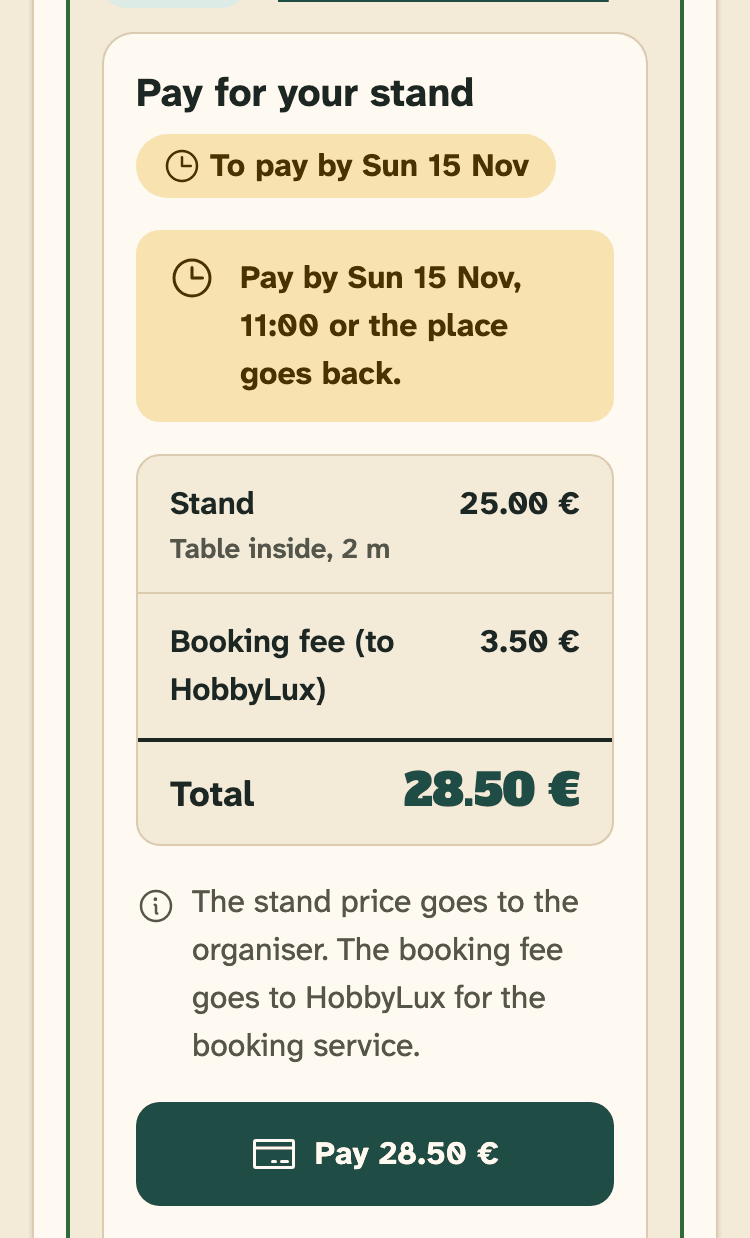
- To pay by: the payment chip with the deadline.
- The deadline: pay by then or the place goes back.
- Stand, booking fee (to HobbyLux) and total.
- Pay: opens the secure Stripe page.
You can pay by card, Apple Pay, Google Pay, Bancontact or Wero. Stripe shows what your device supports.
While you see “Checking payment”, please do not pay again. Stripe is confirming it, and you get an email as soon as it is done. Press Check again to see if it is through.
The Pay button in the email works without signing in.
The deadline
Pay within 7 days of the organiser’s Yes, and at the latest by 00:00 (Luxembourg time) on the day before the market starts, whichever comes first.
Two days before the deadline you get a reminder email, and your panel shows “2 days left”. When the deadline is less than 2 days after the Yes, there is no reminder.
Not paid in time? The place goes back and you are on the waiting list. Nothing was charged. If a place comes free, the organiser can say Yes again, and you get an email.
After you paid
Your request shows “Paid” and “Your stand is booked”. You see who you paid (the organiser), the booking platform (HobbyLux) and See the receipt, the Stripe receipt.
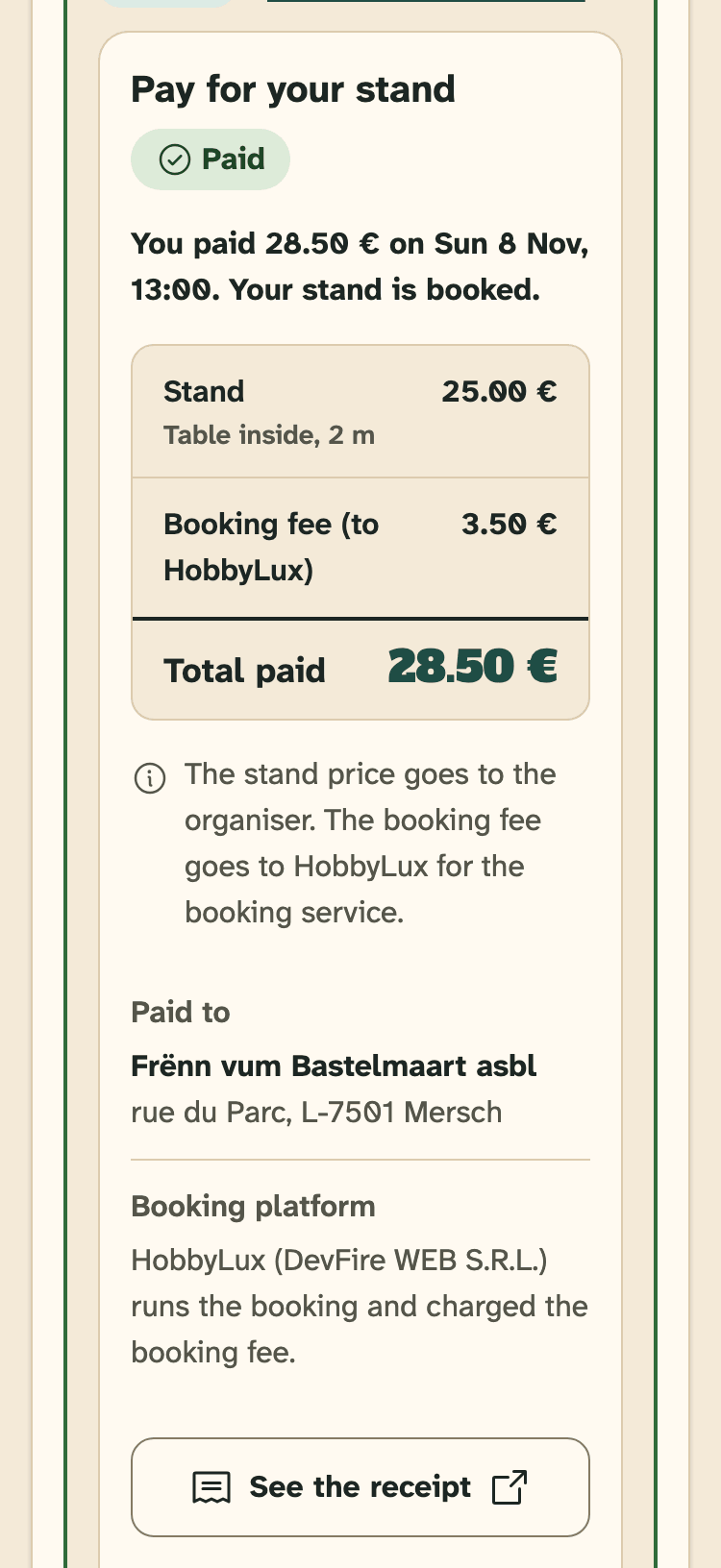
- Paid.
- Paid to: the organiser who sells you the stand.
- See the receipt.
Cannot come after all? See Cancel a stand and ask for a refund.
Payment paused
Sometimes an organiser cannot take online payments for a while. Your request then shows “Payment paused”, and the Pay button cannot be pressed.
Your deadline waits. You get an email when you can pay. If the organiser still cannot take payments when the market starts, the online payment is cancelled and you pay the stand to the organiser on the day.
Paying on the day
On a market without online payment, your Yes shows “Pay the organiser”. Under How to pay you see the organiser’s note, as they wrote it.
HobbyLux takes no money for this stand. Questions about the payment go to the organiser.
Still stuck? Write to hello@hobbylux.app